Over the past few years, enterprise communication has evolved rapidly. Remote working is quickly becoming a significant aspect of day-to-day businesses, and many businesses have hybrid teams, which continue to expand across numerous industries. As a result, businesses want reliable means of communicating so they can remain productive, secure, and work together at the same time. Video conferencing has become a core part of many organizations’ infrastructures. Businesses will no longer seek simple tools for holding meetings.
Your choice will have a major impact on employee productivity, internal communication, client-facing meetings, and other aspects of operational effectiveness. For large enterprises, you will also need a platform that is compliant with security laws, provides centralized management, and provides AI-enhancing automation.
This comprehensive comparison will give you detailed information about how both Zoom and MS Teams perform in important areas such as Meeting Quality, Collaboration Tools, Security, Scalability, Integrations, Pricing, AI Features, and Real Life Applications.
Why Enterprise Video Conferencing Matters?
Enterprise communication no longer relies on enterprises rely on their physical office locations for communication. Instead, global teams use collaboration tools to connect across a variety of countries and time zones. Flexibility and instant communication are what employees expect from their workplace environments today.
Digital collaboration tools are now used by large organizations for:
- Virtual meetings
- Project discussions
- Presentations to clients
- Internal communications
- Collaborating with other teams
- Training sessions
- Webinars and events
Business communication software is now natively integrated into productivity software, cloud storage, customer relationship management (CRM) platforms, and workflow applications.
Modern enterprises expect:
- High-quality video calls
- Reliable performance
- Security at the enterprise level
- Productivity capabilities powered by artificial intelligence (AI)
- Administrative controls
- Support for multiple platforms
- Integrations for a workflow
- Scalability for large teams
Zoom and Microsoft Teams offer a different approach to each of these requirements. Zoom focuses primarily on providing high-quality communication, while Microsoft Teams provides a unified platform for workplace collaboration.
Zoom vs. Microsoft Teams: Quick Comparison
| Feature | Zoom | Microsoft Teams |
| Best For | Video meetings and webinars | Enterprise collaboration |
| Ease of Use | Excellent | Moderate |
| Webinar Features | Advanced | Good |
| Microsoft 365 Integration | Limited | Excellent |
| Collaboration Tools | Basic to moderate | Advanced |
| AI Features | Strong | Advanced |
| Enterprise Security | Strong | Excellent |
| External Meetings | Excellent | Very Good |
| Workflow Integration | Good | Excellent |
| Scalability | Strong | Excellent |
Zoom

The company, which provides video communication services, has built its name around easy-to-use and consistently performing platforms for meetings. Many organizations embraced using Zoom because it allowed people to join their meetings quickly and with no technical expertise (i.e., anyone could join the meeting). Zoom has since expanded beyond basic video meetings and now provides companies with a variety of services on their platform, including:
- Webinars
- Breakout Rooms
- Virtual Events
- Team Chat
- Meeting Summary via AI Technology
- Whiteboarding
- Smart/Automatic Recordings
- Cloud-Based Recording Capabilities.
Zoom still prioritizes providing high-quality video communication to customers who may use Zoom for client interactions, external meetings, webinars, and virtual events. Sales teams, consulting firms, educational institutions, and companies with a remote-first approach have also chosen Zoom due to their reliable meeting experiences.
Microsoft Teams
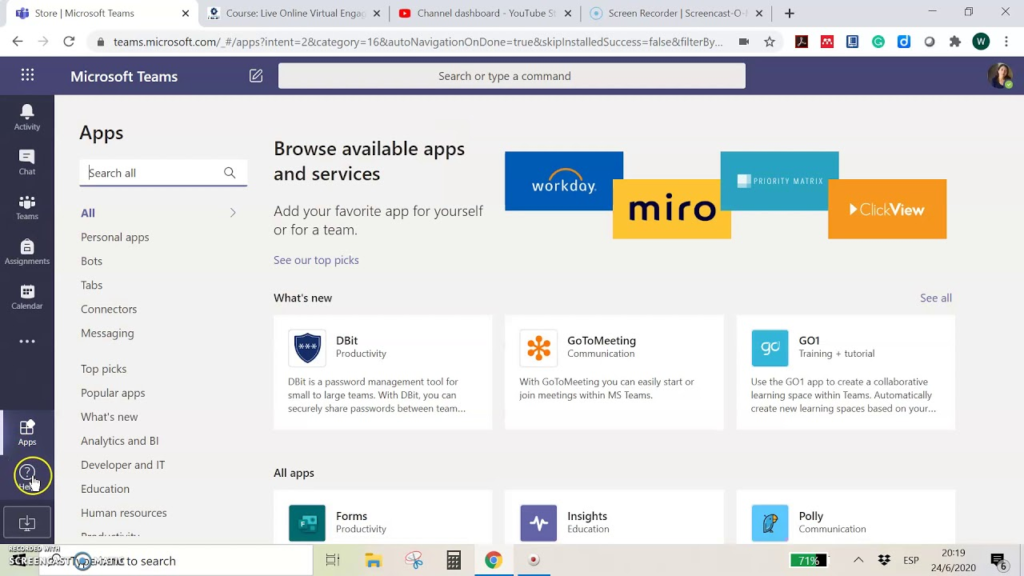
Microsoft Teams is part of the Microsoft & Microsoft 365 Provider Ecosystem. Microsoft Teams provides a unified solution for businesses to bring together all of their meetings, chat and communication tools, file-sharing capabilities, and collaborative tools in one location.
The core capabilities of Microsoft Teams include:
- Video Meetings
- Team Chat
- Collaborative Workspaces/Channels
- File Sharing
- Task Management
- Calendar Integration
- Document Collaboration
- AI-Powered Productivity Tools
For many organizations that are already using products from the Microsoft suite, such as Outlook, OneDrive, SharePoint, MS Word, and MS Excel, adopting Teams should be seamless due to Teams’ ability to facilitate collaboration across multiple departments without requiring users to change applications. Teams act as an integrated digital workspace for several organizations.
Meeting Quality and Performance
Enterprise Communication priorities remain at the core of enterprise communication, and one of the most significant challenges enterprises encounter is providing quality assurance for calls. The consequences of losing voice quality could impact employee productivity, require the use of a different vendor to serve clients, and increase the complexity of teamwork among employees.
Zoom Performance
Zoom has the largest and most reliable video conferencing capabilities across various network types. The Zoom platform delivers seamless support for large meetings and provides stable audio quality even in long-duration meetings. Many companies and organizations prefer Zoom over competing video conferencing products because of its easy-to-use interface and seamless experience for external participants. External participants can join a Zoom meeting quickly, allowing them to participate in the meeting with minimal setup time.
Zoom also performs well during:
- Large Webinars
- Virtual Conferences
- Sales Presentations
- International Meetings
- Client Onboarding Sessions
The platform uses a lightweight structure that often reduces lag and improves meeting stability.
Microsoft Teams Performance
Microsoft has made tremendous improvements in Microsoft Teams (Teams) over the past few years. Microsoft has made significant improvements to the performance of Teams on desktop and mobile applications. Enterprises can now expect better reliability for meetings than might have been available with previous Microsoft Teams versions. For organizations that are already utilizing the Microsoft Ecosystem, Teams perform best at providing team collaboration during the entire day.
However, the Teams platform has many different functions, including chat, file sharing, collaboration, and meetings, all within the same set of applications. Most of the enterprises that report issues regarding heavier resource utilization on older versions of Teams usually use the devices that were purchased prior to the Teams updates. Zoom will continue to maintain a slight performance advantage over Teams for pure meeting performance and external enterprise communication.
Winner: Zoom
Collaboration and Productivity Features
Enterprise collaboration has evolved to encompass many different modes of communication, not just video meetings. To enhance employee-to-employee collaboration and communication, employees also need tools to assist with things such as document sharing and project coordination, as well as assist in tracking workflows.
Microsoft Teams Collaboration Features
The collaboration process through Microsoft Teams creates an entire productivity ecosystem for large organizations, allowing an organization’s employees to:
- Establish project-based channels,
- Instantly share files and collaborate in real-time on document creation,
- Organize department-to-department communication,
- Manage workflow and task assignments, and
- Schedule meetings through Outlook
Teams provides organizations with the ability for users to edit Word documents, review spreadsheets, and work on PowerPoint presentations without having to leave the Teams application. Centralized workflows improve workflow efficiency and decrease software fragmentation in the case of many enterprises. Additionally, internal communications amongst departments and remote workers will be simplified due to the availability of a single, centralized application.
Zoom Collaboration Features
Zoom has expanded its collaboration functionalities in the recent past. Now, the platform includes:
- Team Chat
- Whiteboards
- Shared notes
- A.I. meeting summaries
- Collaborative tools
Nevertheless, Zoom continues to place a larger emphasis on providing meeting and communication services to users. Many companies that utilize the Zoom application also engage in separate project management software for their task and workflow coordination. Microsoft Teams remains the leader in workplace collaboration applications.
Winner: Microsoft Teams
Enterprise Scalability and Administration
A platform that allows many employees to use it, one that can have thousands of participants over multiple departments and locations.
Zoom Scalability
Zoom supports:
- Event hosting for large enterprises
- Large-scale webinars
- Virtual conferences / global events
- High number of attendees at virtual events
- Easy for guests to join (good for external)
MS Teams is strong in enterprise management (user access, compliance policies, security access, device management, and enterprise communication at the department level). Therefore, large companies like Microsoft Teams provide centralised administrative tools for the whole Microsoft ecosystem. Global companies can manage all business communication and collaboration from one place.
Microsoft Teams Scalability
Microsoft Teams offers strong enterprise management capabilities. IT administrators can manage:
- User access
- Compliance policies
- Security permissions
- Device management
- Enterprise communication settings
- Department-level controls
Large organizations often prefer Teams because Microsoft provides centralized administration tools across the entire Microsoft ecosystem. Global enterprises can manage communication and collaboration from a single environment.
Winner: Microsoft Teams
Security and Compliance
In 2026, enterprise security continues to be extremely important. Organizations need to secure their internal communications with one another, as well as their clients’ data and confidential business information.
Both platforms offer:
- Encryption
- User Authentication
- Administrative Controls
- Compliance Certifications
- Access Management
Zoom Security
Zoom has recently made major improvements to its security infrastructure. Enterprise customers now have access to enhanced capabilities and administrative controls that help protect their meetings. Some of the enhanced security capabilities include secure meetings, password protection, waiting room functionality, and role-based permissions. Today, a large number of businesses trust Zoom for their internal communication and for communicating with customers.
Microsoft Teams Security
All of Microsoft’s enterprise-level security products have been integrated into Microsoft’s Teams. Most companies in various industries (health care, finance, law, and government) are choosing to use Teams because Microsoft offers a comprehensive compliance framework with centralized management of security policies across Outlook, SharePoint, OneDrive, and Teams. This makes Teams particularly attractive as a collaborative platform for organizations operating under strict regulatory environments.
Winner: Microsoft Teams
AI Features in 2026
Today, in the business world, Artificial Intelligence, or AI, is driving higher levels of productivity inside companies. Organisations’ employees can use AI tools to automate tedious manual tasks, as well as increase the overall efficiency of their meeting processes through the use of Zoom and Units.
Zoom AI Features
The following Zoom AI features help reduce your post-meeting administrative burden while allowing remote teams to quickly review what was discussed during a meeting:
- Smart meeting summary
- Automatic transcriptions
- AI-generated meeting notes
- Meeting highlights
- Smart recordings
By utilising all these features, teams can quickly review their meetings and be more productive in collaborating after the meeting.
Microsoft Teams AI Features
Microsoft Teams’ integration with Microsoft Co-Pilot provides Teams users with numerous AI-generated tools, including:
- AI-generated meeting recaps
- Intelligent scheduling
- Automated meeting summarisation
- Workflow recommendations
- The ability to make recommendations for tasks
- Contextual productivity tools
Microsoft’s AI ecosystems and other applications provide Microsoft Teams with additional integration to help provide greater productivity benefits from meeting together through collaboration among Outlook, Word, Excel, and PowerPoint.
Winner: Microsoft Teams
Pricing and Enterprise Value
The cost of an enterprise will depend on the size of the business, its feature requirements, and the current software systems they are using.
Zoom Pricing
Zoom pricing typically includes considerations such as:
- the number of users
- webinar capacity
- artificial intelligence functionality
- the total amount of recording storage
- event management tools.
Organizations that primarily rely on video conferencing and webinars have found that Zoom provides them with significant savings.
Microsoft Teams Pricing
Microsoft Teams is currently supporting hundreds of millions of enterprise customers around the world with its Microsoft 365 product suite.
Many enterprises already pay for:
- Outlook
- OneDrive
- Word
- Excel
- SharePoint
The fact that Teams integrates seamlessly into the workflow of existing Microsoft users means that it is easy to avoid switching to separate software applications. This leads to a reduction in overall software costs as all collaboration, meetings, file sharing, and communications are conducted from one central location. Furthermore, Microsoft Teams will typically generate a much greater long-term value for enterprises compared to most other solutions.
Winner: Microsoft Teams
Real-World Enterprise Use Cases
Global Enterprise Operations
Transnational corporations often try to manage their overall operations as one integrated system because they want their customers to be able to experience a unified process across all of their workflow processes. As communications occur in one location with Microsoft Teams, it helps streamline how many departments and geographic locations can be managed together and provides the IT department a higher level of control, admin visibility, and security for their overall management of IT services.
Client-Facing Businesses
For companies with a substantial customer base comprised of outside parties (consultants, agencies, or organizations selling products), Zoom is frequently the go-to tool for conducting external conversations or meetings. It’s a simple process for outside participants to join a Zoom meeting. They do not need to go through a complex onboarding process. Many types of companies with customer-facing employees also use Zoom as the primary method to hold client presentations or webinars, making it an ideal solution.
Hybrid Enterprise Environments
Organizations increasingly employ these two systems together under an integrated business development strategy to:
- Utilize Microsoft Teams for internal collaboration
- Use Zoom to facilitate external meetings through webinars.
By implementing a hybrid approach for these two systems, businesses can benefit from the advantages of both, thus making them better equipped to meet the demands of today’s marketplace.
Pros and Cons
Zoom Pros
- Outstanding meeting and webinar quality
- User-friendly interface
- Quick guest access
- Excellent external communication
- Reliable video conferencing service.
Zoom Cons
- Limited collaboration and integration, functionality specific to Enterprise Applications
- Only limited tools available to support workflow processes
- Need to have additional software to collaborate
- Less complex integration with Enterprise Applications as compared to Teams.
Microsoft Teams Pros
- Tight Extensive Available Integrations with Microsoft 365
- Robust Collaboration Tools
- Secure at the Enterprise Level
- Strong Administrative Controls
- Productivity Enhancement through AI Features
- Centralized communication for Work
Microsoft Teams Cons
- Difficult to navigate
- Need to develop existing Skills to use Microsoft Teams
- Need greater Computing Resources to support Microsoft Teams’ performance
- Some Companies may Require Additional Set-Up to Collaborate Using Microsoft Teams.
Which Platform Should Your Enterprise Choose?
Your operating priorities are important in determining the best platform for your organization. Zoom is a company that benefits enterprise clients due to their requirement for the following:
- reliable, consistent
- external meetings
- high definition video conferencing
- hosted webinars
- hosted virtual events, fast access to meetings
- A simple means of communicating
Microsoft Teams benefits enterprise customers who require the following:
- workplace ecosystem
- digital workspace
- business operations
- remote coordination
- unified communications system.
Many enterprises currently use both tools to enhance their productivity and provide flexibility in their communications.
Final Verdict
Zoom will still be the top video conferencing website in the world. Many companies choose Zoom as their video conferencing tool due to its quality of meetings, webinar performance, and user-friendliness when communicating with clients, hosting virtual events, and collaborating with people outside of the company. Zoom continues to be the communication tool of choice for many businesses all around the world.
Microsoft Teams provides more tools for enterprise collaboration than any other vendor, and combines meetings, communication, workflows, file sharing, and AI-based productivity tools into a single, fully integrated platform. Therefore, Microsoft Teams would be the natural fit for larger companies requiring scalability, administrative control, security, and integration with Microsoft 365 products.
When selecting which platform your organisation will use, consider how your organisation operates. If you need the highest quality meeting solution, Zoom will be your best option. If you want the best overall collaboration solution, Microsoft Teams is the best option, as it can provide more types of collaboration than Zoom can.
FQA’s
Which platform works better for large enterprises?
Typically, Microsoft Teams is a better option for larger organizations due to having the best collaboration tools, centralized control, and compatibility with Microsoft 365.
Is Zoom better for webinars?
In general, Zoom is one of the Better Platforms for hosting Webinars. This is because it can handle large-scale virtual events, and it manages Outside Meetings very well.
Do enterprises use both Zoom and Teams?
Absolutely, many companies use Teams for their Internal Collaboration and then use Zoom for meetings or Webinars with Clients.
Which platform offers stronger security?
Both have Enterprise-Grade Security. There is a slight edge to Microsoft Teams for Highly Regulated Businesses because of the broader Security Ecosystem of Microsoft.
Which platform costs less for enterprises?
Again, Microsoft Teams is usually more cost-effective for Businesses that have a Microsoft 365 Subscription.
Which platform feels easier to use?
Zoom generally is the easier of the two Platforms for first-time users. The overall layout of the Zoom Application also tends to be very Easy to navigate, so that accessing a Meeting can happen quite quickly.
Which platform supports remote teams better?
Both platforms work well with supporting Employees that are Remote. Teams tends to be better at supporting Internal Collaboration, while Zoom is superior at supporting Meetings and Webinars.
Is Microsoft Teams replacing Zoom?
While Microsoft Teams continues to see Large Growth, Zoom is still very popular for its Quality of meetings, and it’s Ability to Host Webinars.