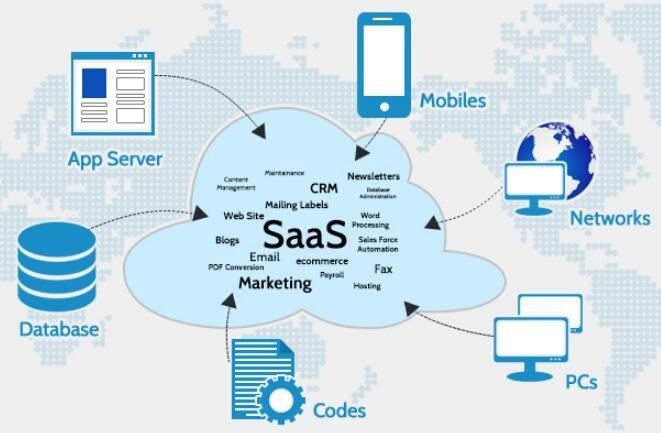
Enterprise software has traditionally been associated with high costs, long-term contracts, and complex implementations. Large organizations often invest thousands of dollars annually in software for project management, customer relationship management (CRM), communication, and data storage. However, the rapid growth of Software-as-a-Service (SaaS) has created a new generation of platforms that offer powerful features at little or no cost.
For startups, freelancers, and small businesses, free SaaS tools provide an opportunity to access enterprise-level functionality without the financial burden. While free plans often include limitations, many platforms offer enough capability to support growing teams.
Choosing the right free SaaS alternative requires careful evaluation. As discussed in Free vs. Paid SaaS: When is it Worth Upgrading?, the goal is not simply to minimize costs but to maximize value while maintaining scalability.
This guide examines the top five free SaaS alternatives to expensive enterprise software, focusing on functionality, usability, and long-term viability.
Why Businesses Are Moving Away from Expensive Enterprise Software
Enterprise software often includes advanced features that many organizations never use. As a result, companies end up paying for functionality that provides little practical value.
Common challenges with enterprise software include:
- High subscription costs
- Long-term contracts
- Complex onboarding
- Expensive upgrades
- Limited flexibility
Free SaaS alternatives address many of these issues by offering flexible pricing models and simplified interfaces.
Small organizations in particular benefit from this approach. Instead of committing to expensive platforms immediately, teams can test solutions and upgrade only when necessary.
What to Look for in Free SaaS Tools
Not all free SaaS tools provide meaningful value. Some plans are heavily restricted, making them unsuitable for real-world use.
The most useful free SaaS platforms typically include:
Core Functionality
Essential features should be available without requiring an upgrade.
Scalability
The platform should support growth without requiring immediate migration.
Integrations
Compatibility with other tools improves efficiency.
Reliability
Stable performance is essential for daily operations.
Upgrade Path
A clear upgrade path ensures long-term usability.
These criteria are consistent with SaaS evaluation frameworks discussed in Best Learning Management Systems (LMS) for Online Course Creators, where usability and scalability are key considerations.
1. HubSpot (Free CRM Alternative)
Customer relationship management systems are among the most expensive enterprise tools. Many enterprise CRMs require significant upfront investment and ongoing subscription fees.
HubSpot offers a free CRM that provides core functionality suitable for small and mid-sized teams.
Key Features
- Contact management
- Deal tracking
- Email tracking
- Basic reporting
- Pipeline management
Why It’s a Strong Alternative
Enterprise CRM platforms often require dedicated administrators. HubSpot’s free CRM provides a simplified interface that allows teams to manage customer relationships without technical expertise.
Many startups use HubSpot as an entry point before considering enterprise solutions. This approach aligns with CRM adoption strategies discussed in Salesforce vs. HubSpot: Which CRM is Better for US Startups in 2026?
Limitations
Advanced automation and reporting features require paid plans. However, the free version is sufficient for many small teams.
Best For
This is best for startups and small businesses that need CRM functionality.
2. Trello (Project Management Alternative)
Project management software is often one of the first enterprise tools companies adopt. However, enterprise-grade project management platforms can be expensive and complex.
Trello offers a free plan that provides visual task management through boards and cards.
Key Features
- Task boards
- Lists and cards
- Due dates
- File attachments
- Team collaboration
Why It’s a Strong Alternative
Trello’s simplicity is its greatest strength. Teams can organize projects quickly without training or onboarding.
Many organizations start with Trello before moving to more advanced platforms. This progression mirrors adoption patterns discussed in Monday.com Review 2026 and similar project management evaluations.
Limitations
The free plan includes limited automation and integrations.
Best For
It is best for small teams and simple projects.
3. Slack (Communication Alternative)
Enterprise communication tools often include advanced compliance and administrative features that small teams may not need.
Slack offers a free version that supports team messaging and collaboration.
Key Features
- Team messaging
- Channels
- File sharing
- Integrations
- Notifications
Why It’s a Strong Alternative
Slack centralizes communication and reduces reliance on email. Even the free version provides enough functionality for many teams.
Communication tools play a critical role in SaaS ecosystems, as discussed in Zoom vs. Microsoft Teams: Best Video Conferencing SaaS for Large Enterprises.
Limitations
Message history is limited in the free version, which may affect long-term record-keeping.
Best For
It is best for Small teams that need centralized communication.
4. Google Workspace (Office Software Alternative)
Enterprise office software suites often require expensive licenses and ongoing fees.
Google Workspace offers free tools that support document creation and collaboration.
Key Features
- Document editing
- Spreadsheets
- Presentations
- File storage
- Real-time collaboration
Why It’s a Strong Alternative
Cloud-based collaboration eliminates the need for expensive desktop software.
Many teams rely entirely on Google Workspace for daily operations.
Limitations
Advanced administrative controls require paid plans.
Best For
Teams that need collaborative productivity tools.
5. Zoho (Business Software Alternative)
Zoho provides a wide range of business applications, many of which include free plans.
Key Features
- CRM tools
- Project management
- Invoicing
- Document management
Why It’s a Strong Alternative
Zoho’s ecosystem allows businesses to replace multiple enterprise tools with a single platform.
Integrated ecosystems are becoming increasingly important, as discussed in Must-Have SaaS Tools for Healthcare Providers (HIPAA Compliant).
Limitations
Free plans may include user limits.
Best For
Small businesses that need multiple tools.
Comparing Free SaaS Alternatives
| Tool | Category | Free Features | Best for |
| HubSpot | CRM | Contacts and Deals | Sales Team |
| Trello | Projects | Task boards | Small teams |
| Slack | Communication | Messaging | Collaboration |
| Google Workspace | Productivity | Documents | Teams |
| Zoho | Business | Multiple apps | Small Businesses |
When Free SaaS Tools Are Enough

Free SaaS tools can support real business operations, especially during early growth stages.
They are often sufficient when:
- Teams are small
- Workflows are simple
- Budgets are limited
- Growth is gradual
Many businesses operate successfully for years on free SaaS plans.
When It’s Time to Upgrade
Eventually, growing organizations may need additional features.
Signs that an upgrade is necessary include:
- Storage limits
- User limits
- Missing features
- Integration needs
- Reporting requirements
Upgrading should be a strategic decision rather than an automatic one.
Risks of Relying on Free SaaS Tools
While free SaaS tools offer value, they also include risks.
Feature Limitations
Free plans may lack advanced functionality.
Usage Limits
Some platforms restrict usage levels.
Support Limitations
Free users may receive limited support.
Migration Challenges
Switching platforms can require effort.
Despite these risks, many free tools provide reliable service.
Building a Free SaaS Stack
Many organizations combine multiple free tools into a single workflow.
A typical free SaaS stack might include:
- HubSpot for CRM
- Trello for projects
- Slack for communication
- Google Workspace for documents
- Zoho for business tools
This approach allows organizations to build powerful systems without large investments.
The Future of Free SaaS

Free SaaS plans are becoming more sophisticated. Companies use free tiers to attract users and demonstrate value.
Future developments may include:
- More integrations
- Better automation
- AI features
- Improved analytics
- Expanded storage
As SaaS platforms evolve, the gap between free and enterprise software continues to narrow.
Final Thoughts
Free SaaS alternatives have transformed the software landscape. Tools like HubSpot, Trello, Slack, Google Workspace, and Zoho offer functionality that rivals many enterprise platforms.
For startups and small businesses, these tools provide an accessible entry point into modern software ecosystems. Instead of committing to expensive enterprise solutions, organizations can adopt flexible tools that grow with their needs.
Free SaaS platforms are not just temporary solutions. They can support long-term operations and provide a strong foundation for growth if chosen carefully.
In an increasingly competitive environment, the ability to leverage powerful tools without significant financial investment can be a decisive advantage.
FAQs:
1. Are free SaaS tools really enough for small businesses?
Yes, many free SaaS tools provide enough functionality for small teams. Platforms like HubSpot and Trello offer core features that support daily operations without requiring paid subscriptions.
2. What is the biggest limitation of free SaaS plans?
The most common limitations include storage caps, user limits, and restricted features. For example, Slack limits message history on its free plan.
3. Can free SaaS tools replace enterprise software completely?
In some cases, yes. Many small businesses operate entirely on free tools like Google Workspace and Zoho, though larger organizations may eventually need advanced features.
4. Are free SaaS tools secure?
Reputable SaaS providers implement standard security measures such as encryption and secure logins. Major providers like Google Workspace follow industry security practices.
5. When should a business upgrade from a free SaaS plan?
Businesses should consider upgrading when they reach usage limits, need advanced features, or require more integrations. Many companies start with HubSpot’s free tools before upgrading as they grow.
6. Do free SaaS tools include customer support?
Free plans often include limited support, usually through help centers or community forums. Priority support is typically reserved for paid users.
7. Can I use multiple free SaaS tools together?
Yes, many businesses combine tools like Trello for project management and Slack for communication to create a complete workflow.
8. Are free SaaS tools suitable for startups?
Free SaaS tools are especially useful for startups because they reduce initial costs while still providing essential functionality.
9. What happens to my data if I stop using a free SaaS tool?
Most platforms allow you to export your data before closing your account. Tools like Zoho and Google Workspace provide data export options.
10. Do free SaaS tools include integrations?
Some free plans include basic integrations, but advanced integrations are often part of paid tiers.