Software is an essential part of today’s modern startup ecosystem. Startups rely heavily on SaaS tools for their communication, project management, and customer service/technical support. Every day, new SaaS companies/solutions come out, each with its own unique selling proposition of helping you achieve faster growth and providing efficient workflows.
This much variety in SaaS offerings creates a significant problem for startups. Your biggest challenge is finding the right SaaS tool for your particular business needs. You may find a SaaS tool that looks good in the demonstration, yet it may not work well for your startup in the operational phase.
Using the right SaaS tool will ultimately provide a better user experience. Using the right SaaS tool will provide a more simplified approach to operating your business and allow for more automated repetitive tasks. Good SaaS products work seamlessly and with very little friction.
SaaS Selection as a Strategic Decision
Your daily operations are greatly affected by software. Any given software tool is integrated with both your workflow and your reporting systems. Poorly functioning systems make it difficult for start-ups to grow and be productive. Unconnected systems waste your time and can lead to lost information.
Don’t rush into making this decision. Many founders buy software simply based on what they see on social media or because they believe it is more expensive. Advanced software is rarely the best.
A good SaaS platform will complement your business model and have the flexibility you require to continue doing what you do well. Be careful when adding new platforms to your software stack.
Define the Real Problem First
Many entrepreneurs look for tools before determining their real problems. For example, you might ask, “Which CRM works best for a startup?” By asking this type of question, you are skipping an important step in the process. Before you look for a solution, you should consider why your process is not working.
The software is simply the means of solving a specific problem. You cannot expect that a new platform will fix your broken process. It is essential to define your operational challenges clearly before searching for software.
For instance, your customer service team may not be able to see what is happening in your operation. Your marketing team may not be able to track how well they are performing. When you know what the challenge is specifically, software evaluation will be easier.
Choose Software for Your Current Stage
Every SaaS platform does not fit every startup stage. A small team has different needs than a large department. Many founders purchase enterprise systems too early. This habit creates unnecessary complexity.
Early-stage startups benefit from lightweight platforms. You move faster when tools are easy to manage. Growth-stage companies require deeper functionality. You need stronger analytics and automation as you expand.
You must find a balance. Your software should support your current work. It must also allow for future growth. You should avoid paying for features that your team never uses.
Avoid Marketing Hype
SaaS providers typically spend a lot of money on advertising, presenting polished landing pages and impressive videos. The marketing copy will not necessarily result in a good business.
Most services are about selling rather than providing solutions. Therefore, you need to concentrate on how practically usable the product is, rather than its promotional claims. Will your employees be able to learn how to use it? Does the interface seem intuitive?
An intuitive tool will often outperform a busy platform. You will find greater value in a tool that performs one function well than in software that performs many functions less than optimally. Select software that provides real utility to your team.
Integrations Matter in SaaS Tools
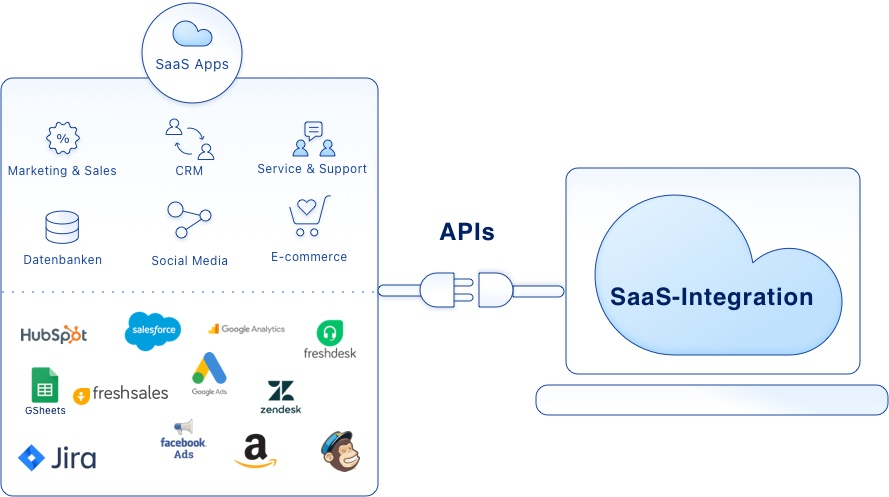
A SaaS platform should never operate in isolation.
Modern startups rely on multiple systems every day. Sales teams use CRM software. Marketing departments depend on analytics and automation platforms. Finance teams use accounting systems. Communication happens through collaboration tools.
When these systems fail to connect properly, businesses create data silos that slow down operations.
Employees begin transferring information manually between platforms. Reporting becomes inconsistent. Decision-making becomes slower because teams lack centralized visibility.
That is why integration capabilities matter so much.
Before choosing any SaaS tool, evaluate how well it works alongside your existing systems. Strong API support, native integrations, and flexible workflows can save countless operational hours later.
Future scalability also matters here.
A startup may only need basic integrations today, but operational complexity usually increases over time. Choosing flexible systems early reduces future migration problems.
Cheap SaaS Can Cost You More
Many startups focus too heavily on subscription pricing.
A platform may appear affordable on the surface, but hidden operational costs often create much larger problems later.
Software expenses extend beyond monthly pricing.
Poor onboarding experiences waste employee time. Weak usability reduces productivity. Limited integrations create manual work. Upgrade restrictions force businesses into expensive plans unexpectedly.
A cheap tool that slows operations can easily cost more than a premium platform that improves efficiency significantly.
Smart founders evaluate software through long-term operational value instead of short-term pricing alone.
A strong SaaS platform should:
- Save time
- Improve visibility
- Increase efficiency
- Support automation
- Reduce repetitive work
That creates measurable ROI over time.
The goal is not to find the cheapest tool. The goal is to find the platform that creates the highest business value.
Scalability Should Always Be Part of the Decision
Your startup will look very different as it grows. Teams grow larger; data volumes increase; customer expectations escalate; reports become more sophisticated; complexity increases as companies scale up their operations.
Some SaaS applications have performed well for small teams but cannot handle the amount of work coming through their doors as they serve a larger number of users or require more capabilities than originally anticipated.
Founders must evaluate scalability before making long-term investments.
Some key questions founders should ask are:
- Can the platform handle future growth?
- Will pricing remain affordable as the team grows?
- Will the system provide support for future advanced workflows?
- Will data need to be migrated in the short term?
When companies switch software, they can cause major disruptions to operations. Therefore, data migrations can take time, disrupt the operation of the business, and create unnecessary stress among all involved with these transitions. Making sure you choose a scalable system to meet your future business needs when starting will help companies mitigate these issues as they experience the growth of their businesses in the future.
Customer Support Reveals the True Quality of a SaaS Company
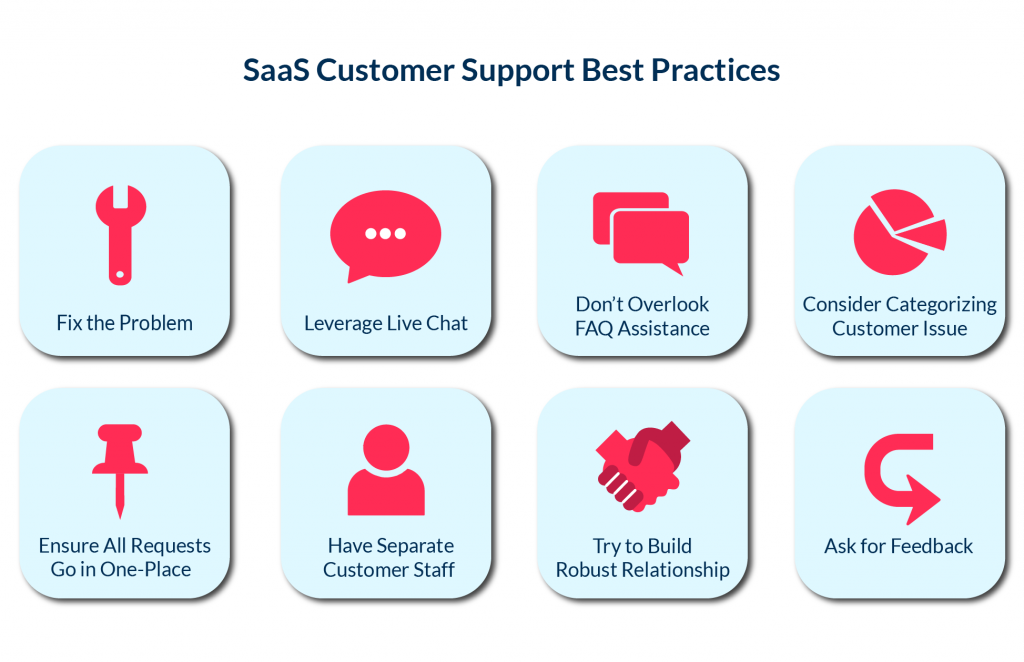
All platforms will perform extremely well during a sales demo.
Most users will only experience the product’s true capabilities after it is implemented.
Utilizing the software daily means dependence on customer support and, therefore a strong need for it. Excellent platforms can still experience technical difficulties, integration problems, and confusion in their workflows.
If a company does not provide adequate support, there can be delays in getting support, frustrations trying to get support, and downtime from operations.
Make sure to thoroughly investigate the company that makes the SaaS product you are purchasing before making your purchase. Look for customer reviews from multiple sources and pay special attention to reviews that have the same problems/complaints.
Here are some common examples of red flags:
- Slow Response Time
- Billing Issues
- Frequent Downtime
- Poor Onboarding Process
- Poor Documentation
- Hidden Fees
You cannot have reliable software without also having reliable support services.
Without reliable support services, the value of the platform is diminished for the business when it is most critical.
Always Test Software Before Committing
Founders should never purchase SaaS software blindly.
Free trials and pilot programs exist for an important reason. They allow teams to evaluate real usability before making financial commitments.
This stage should involve actual employees, not just leadership teams.
Founders sometimes approve software that looks impressive during presentations but feels frustrating inside daily workflows. Low adoption often follows poor testing processes.
During evaluation, focus on practical experience.
Observe how quickly employees learn the platform. Examine workflow compatibility carefully. Evaluate reporting quality, speed, navigation, and automation features.
Successful adoption determines software value.
Even the most advanced platform becomes useless if teams avoid using it consistently.
Security and Compliance Are No Longer Optional
Data security has become a serious business responsibility.
Customers expect startups to protect sensitive information properly. Investors also evaluate operational security more carefully than before.
If your company handles payment information, healthcare records, customer databases, or international users, compliance standards become even more important.
Strong SaaS platforms should provide:
- Data encryption
- Secure backups
- Access controls
- Compliance certifications
- Reliable recovery systems
A single security incident can damage trust permanently.
Startups should treat security evaluation as a core part of SaaS selection instead of an afterthought.
Avoid SaaS Tool Overload
Too many tools being used can overload your SaaS
A lot of times, startups put too many tools on too quickly, and at first, they all look like they are useful, and eventually, the company has a bunch of disconnected dashboards with overlapping subscriptions that have duplicate features as well as difficult workflows. When this occurs, the result is called SaaS fatigue.
It takes employees longer to switch from one system to another, and every business will incur a greater expense with each passing month, and they will lose the ability to communicate effectively and eventually lose clarity of operations.
A Lean software stack typically performs better than a heavily loaded one.
In order for founders to continue using their tools efficiently, they should periodically review all tools the company uses and eliminate any that don’t deliver tangible/defined benefits.
Simple systems tend to scale better than complicated ecosystems.
Final Thoughts
Selecting an appropriate SaaS tool can significantly impact the success of a start-up’s operation.
A strong platform provides more than just the addition of capabilities to a company. It increases the effectiveness of execution, provides better visibility and improved scale, and lessens the pain associated with running a business on a day-to-day basis.
When evaluating options, founders should avoid making purchases based on emotion and concentrate instead on the following:
1) Business need;
2) Compatibility with current workflows;
3) Quality of the platform;
4) Participation of other team members; and
5) Current and future operational value of the product.
If you are making smart software decisions today, you will save a large amount of time, money, and operational stress in the future.
The software you choose should enhance growth, not create confusion.