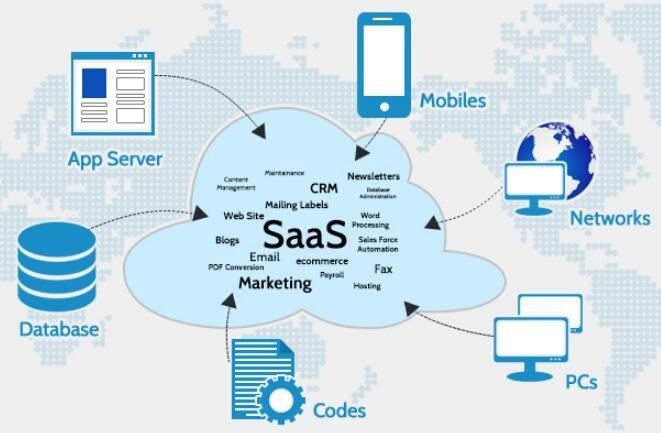
There are many businesses that have made remote work common since 2026. With employees in multiple cities/countries, coordination between teams across these distances can still be difficult, even though work seems to have become increasingly flexible.
Challenges arise from having team members working from various locations. You miss updates due to your team being too far apart and responsibilities become muddled. Tools and information become fragmented across different systems and platforms.
Project management software can help address these issues. They provide you with organization for your day-to-day work activities and serve as a centralized place for keeping tasks visible and organized.
One of the most used project management systems is Monday.com.
The question remains – Is Monday.com worth the money for use by remote-located teams in 2026 or just another over-hyped solution?
Let’s clarify everything here and see what we can find.
What is Monday.com?
Monday.com acts as a cloud-based work management platform. It helps manage your projects, tasks, and workflow processes in a single dashboard.
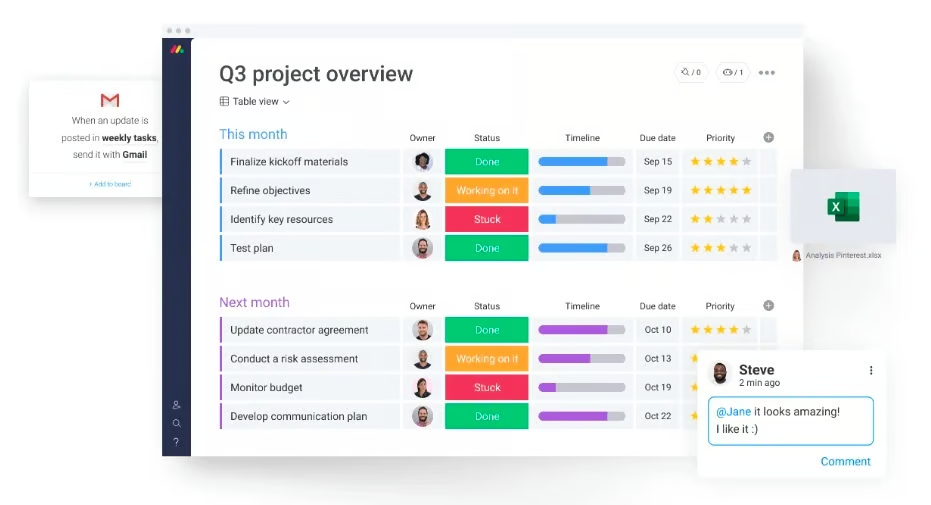
No more using spreadsheets and endless email threads. Now, you will have everything in one place. The system provides you with the visibility of all work in progress.
You will know about anything requiring your attention. You will have visibility regarding the owner of each task. In addition, you will manage deadlines without confusion.
In addition to this, Monday.com caters to many kinds of teams. The tool can be used by remote teams, marketing firms, startups, product teams, and software teams.
Everything boils down to one thing—visibility of work without any hassle.
Why Remote Teams Use Monday.com?
Remote teams struggle most with visibility. You do not sit in the same room. You cannot check progress by walking over to someone’s desk. That gap creates confusion.
Monday.com solves that problem through a shared workspace. Every task stays visible in real time.
You no longer need constant status updates. You open the board and see everything instantly.
Remote teams rely on Monday.com because it improves coordination in a simple way.
It helps you:
- reduce constant meetings
- centralize communication across tasks
- assign clear ownership for work
- track progress in real time
- improve accountability across team members
Team alignment becomes easier when everyone sees the same data. Time zone differences also become less painful.
Key Features of Monday.com
Monday.com offers more than basic task tracking. You get a flexible system that adapts to different workflows.
Visual Boards
Monday.com uses boards as its core structure. Each board represents one project. You build your workflow inside that board.
Each task holds important details:
- task name
- status update
- deadline date
- assigned person
- priority level
You switch between multiple views based on your needs:
- list view
- Kanban view
- calendar view
- timeline view
You get full control over how you see your work. Visual clarity improves decision-making speed.
Task-Based Communication
Monday.com holds all communication within tasks, eliminating the need for app switching.
Comments can be left directly on tasks. You can tag teammates with any updates. Files can be attached in the same workspace as the task. You can also share progress with your team members as it happens.
Your team discussions are kept as part of the actual task being worked on, so there is no disorganization of information across platforms.
Automation System
The use of automation rules on Monday.com from the beginning of your operation reduces the amount of manual work that is required by enabling you to set conditions only once, allowing the system to execute repeating actions automatically (i.e task assignments, reminders prior to deadlines, updating by status changes, notifications to users when something is changed).
Dashboards and Reporting
The use of dashboards on Monday.com provides you with a full picture of everything that is happening, so you can monitor your projects health in one area (i.e project status, workload distribution, task completion percentages, and future deadlines).
Integration with Other Tools
You can easily integrate Monday.com with other applications so that your overall workflow remains unchanged and you can continue to work in all of the systems you are used to using, while also enhancing the structure of those systems (i.e Slack, Google Drive, Microsoft Teams, Zoom and GitHub).
User Experience
Monday.com uses a clean and visual interface. You understand the layout quickly even if you are new to project tools.
Drag-and-drop features make task handling simple. Color labels improve readability. Navigation feels smooth and structured.
The platform also provides ready templates for different use cases:
- project planning
- marketing campaigns
- content calendars
- product launches
You save setup time because templates give you a starting structure.
Advanced features take more time to learn. You may need practice before you master full automation or complex workflows.
Pricing Overview
Monday.com uses a tiered pricing system where costs go up as your team grows or as you require more sophisticated features. The free plan has basic tools for a minimal user base and will work for individuals or very small groups.
The basic plan includes task and project management features, which are suited to smaller teams with simpler needs. The standard plan is the most widely adopted plan. It has automation and integration capabilities to help run your daily workflow.
The pro plan has advanced reporting features and dashboards, which are well suited to larger teams and their more complicated needs.
Enterprise customers will benefit from enterprise plans that place an emphasis on security, support, and scalability.
While the price-point may be more than you would spend for more basic tools, many teams are willing to tolerate higher costs for the productivity benefits they receive from this tool.
Pros and Cons
Pros
Monday.com allows for flexibility of different types of workflows, and it’s customizable to meet the unique needs of each customer. The platform provides a clean visual interface that enables users to immediately recognize tasks with very little effort.
Automated processes will allow for less manual work. Therefore, all communications will remain centralized and allow all of your team members to see what happened with that task. Also, the use of dashboards provides managers with instantaneous visibility into their team’s activity.
Cons
Pricing can be significantly impacted by the growth of your team and/or organization. Some smaller organizations might find this to be a struggle due to their limited budgets.
Trying to learn advanced features may take you some time. Therefore, you may not use them as efficiently as possible due to lack of experience.
Some companies may become overwhelmed due to the number of features available in Monday.com. They may want a more straightforward workflow.
Comparison with Other Tools
Monday.com is typically compared to other project management tools.
Monday.com vs Asana
With Asana, what’s generated is relatively simple in nature compared to Monday.com, which focuses more on customizing and allowing flexible options.
Monday.com vs Trello
Trello is designed to be simple. Monday.com has a lot of tools to control your workflow.
Monday.com vs ClickUp
ClickUp has a large number and variety of features; Monday.com has a strong design emphasis on making sense of visual organization.
These systems suit various types of teams; therefore, selecting one will depend on your business team.
Best Use Cases
Monday.com works best in structured environments. You get maximum value when multiple people handle shared projects.
It fits well for:
- remote teams
- marketing agencies
- startups
- product teams
- multi-project operations
Complex workflows benefit most from its structure.
When It May Not Be Ideal?
Monday.com does not suit every situation.
Simple task needs do not require such a heavy system. Small teams may find it more than they need.
You may not need it if:
- your work stays very simple
- your team stays very small
- your budget stays limited
- you prefer minimal tools
Simple tools often work better in such cases.
Final Thoughts
Monday.com has proven to be an effective project management solution for 2026. Teams working remotely appreciate how well-structured and visible the system makes their work.
The Monday.com platform gives users better task control. It increases communication between team members. It also decreases confusion about what everyone is doing on a day-to-day basis.
If you need coordination and structure to your work, you will benefit from using the Monday.com platform. If you have basic needs, the Monday.com platform will feel cumbersome to you.
You need to customize the Monday.com platform to your daily workflow instead of altering your workflow to fit into the Monday.com framework.